
This walkthrough covers the most common case — a B2C (Business to Customer) sales invoice.
- Go to Invoices and click New Invoice.
- Document Details: set Transaction Type to B2C, Document Type to INV, and set the Date.
- Buyer Details: enter the Legal Name and an Email or Phone.
- Item List: select the Nature of Supplies (Goods or Service), then for each line item enter:
- Item Code, Product Description, Unit, Tax Code, Quantity, Unit Price
- Optionally a Discount amount or Discount %
- Value & Payment: set the Invoice Currency (ETB by default), Payment Term and Payment Mode.
- Click Submit Invoice.
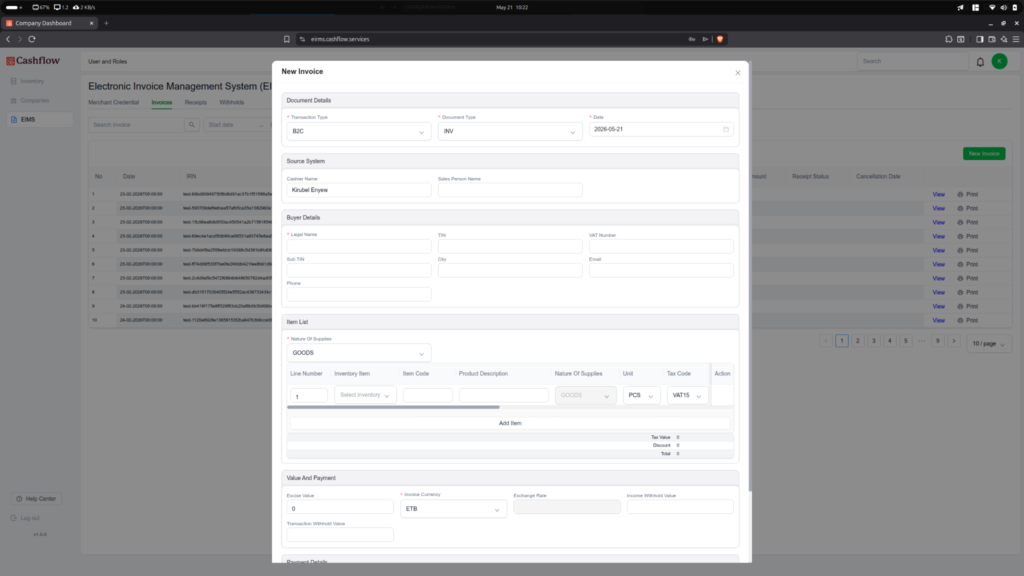
Tip: Line totals — pre-tax value, tax amount and total line amount — are calculated in real time as you type, so you can check the figures before submitting.